Build a 30-day budget for a small, API-backed document agent, then check it in the DeployManual cost calculator. You will finish with three scenarios, a resource-selection decision, and a list of charges to verify before buying anything.
Worked budgeting exercise. The arithmetic and calculator handlers were checked locally. The exercise workload, rates, and resource allowances are fictional; the separately labeled DeepInfra note cites published product information. No cloud billing test, production benchmark, or paid deployment was performed. The decision diagram is an explanatory illustration, not a provider screenshot.
Before you start
Allow about 25 minutes. You need a browser with JavaScript enabled, this guide, and the calculator in a second tab. No cloud account, payment card, API key, or purchase is needed for this exercise.
Use USD for every amount in the example. The calculator changes the currency label only; it does not convert currencies, fetch prices, save a budget, or enforce a spending limit. Copy your final inputs and results into your own notes before leaving the page. A month here means a 30-day planning period, not a provider’s billing calendar.
For a real budget, first gather the exact model and processing mode, anticipated task volume, measured usage if available, candidate hosting configuration, backup retention, and current official quotes. Mark missing information as unknown, rather than entering zero and treating it as free.
1. Define the work before choosing a server
Our fictional agent receives a short document, makes a draft, and checks the draft using an external model API. It does not run a local model or a headless browser.
| Planning item | Exercise assumption |
|---|---|
| New tasks | 20 per day for 30 days: 600 attempted tasks |
| Ordinary model calls | 3 per task, before retries |
| Extra model calls | 20% of ordinary calls, for retries or repairs |
| Average billable tokens per call | 2,000 uncached input; 500 output |
| Peak application concurrency | 2 jobs; documents no larger than 2 MB |
| Success target | At least 90% of attempted tasks accepted after review |
| Time target | 95% of completed tasks within 120 seconds, including queue time |
These are test targets and assumptions, not measurements or a claim that any particular server meets them. Task totals drive API spend; simultaneous work, parsing, tools, and retained data drive application capacity.
Use the decision below to decide what you need to price. If the architecture itself is unclear, first read where an AI agent should run.
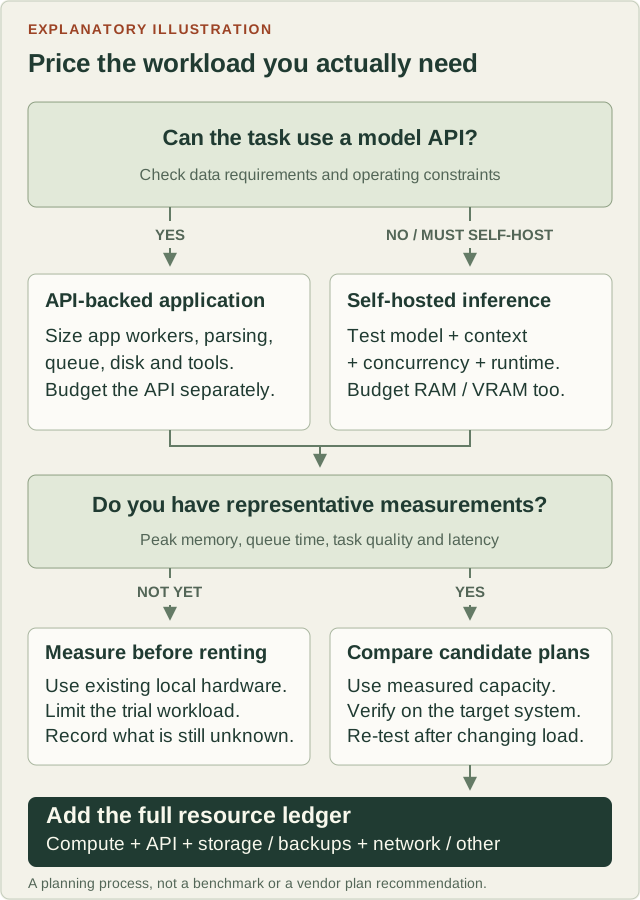
For this exercise, follow the API-backed application branch. The USD 12 compute allowance used later is a made-up budget line, not an identified plan or proof of sufficient capacity. Before renting, run representative tasks on available development hardware and record peak RAM, CPU saturation, free disk, queue time, and completion time at the target concurrency. If that hardware differs from the candidate server, the result is only a starting estimate; validate on the selected configuration during an authorized trial.
Use observed symptoms to choose the next change:
- Out-of-memory errors or heavy swapping: reduce simultaneous workers or test a candidate with more RAM. Browser and document workers need their own allowance
- Busy CPU and growing queue: reduce local work, limit concurrency, or compare CPU capacity. Measure again rather than assuming a larger plan fixes every delay
- Idle host while waiting for the model, rate limits, or network: inspect the API quota, response time, and retry policy before paying for more host CPU
- Self-hosted model: test the exact model, quantization, context length, and concurrent requests. Ollama documents additional memory requirements and queuing under load in its concurrency FAQ. A model file fitting on disk is not a memory-capacity test
2. Work out the model API line
Use deliberately fictional rates of USD 2 per million uncached input tokens and USD 8 per million output tokens. These are arithmetic inputs for an unnamed model, not OpenAI or Vultr prices. This simplified exercise assumes no cache writes, cache discounts, or separately billed tools. For a real workload, replace the rates and categories with the applicable official API pricing.
Calculate in this order:
- Ordinary calls: 600 tasks × 3 calls = 1,800 calls
- Extra calls: 1,800 × 20% = 360 calls
- Total calls: 1,800 + 360 = 2,160 calls
- Input tokens: 2,160 × 2,000 = 4,320,000 tokens; cost = 4.32 × USD 2 = USD 8.64
- Output tokens: 2,160 × 500 = 1,080,000 tokens; cost = 1.08 × USD 8 = USD 8.64
- Model API estimate: USD 8.64 + USD 8.64 = USD 17.28 per 30 days
Checkpoint: one average call costs USD 0.008 in this fictional model. The calculator does not calculate tokens or retries; you enter the resulting 17.28 yourself.
Do not add the 20% retry allowance again if your measured usage already includes retries. Do not charge total input at an uncached rate and then add cached input a second time: allocate actual token categories to their applicable rates. Also account for separately billed tools, cache writes, or other categories your provider reports. Longer history and retrieved documents can change the average dramatically.
At the assumed 90% acceptance rate, 600 attempts produce 540 accepted results. API cost per attempted task is 17.28 ÷ 600 = USD 0.0288; per accepted result it is 17.28 ÷ 540 = USD 0.032. Include rejected and abandoned work in spend. Keep task IDs, usage categories, retries, timing, and disposition; full prompts are not needed just to calculate this ledger.
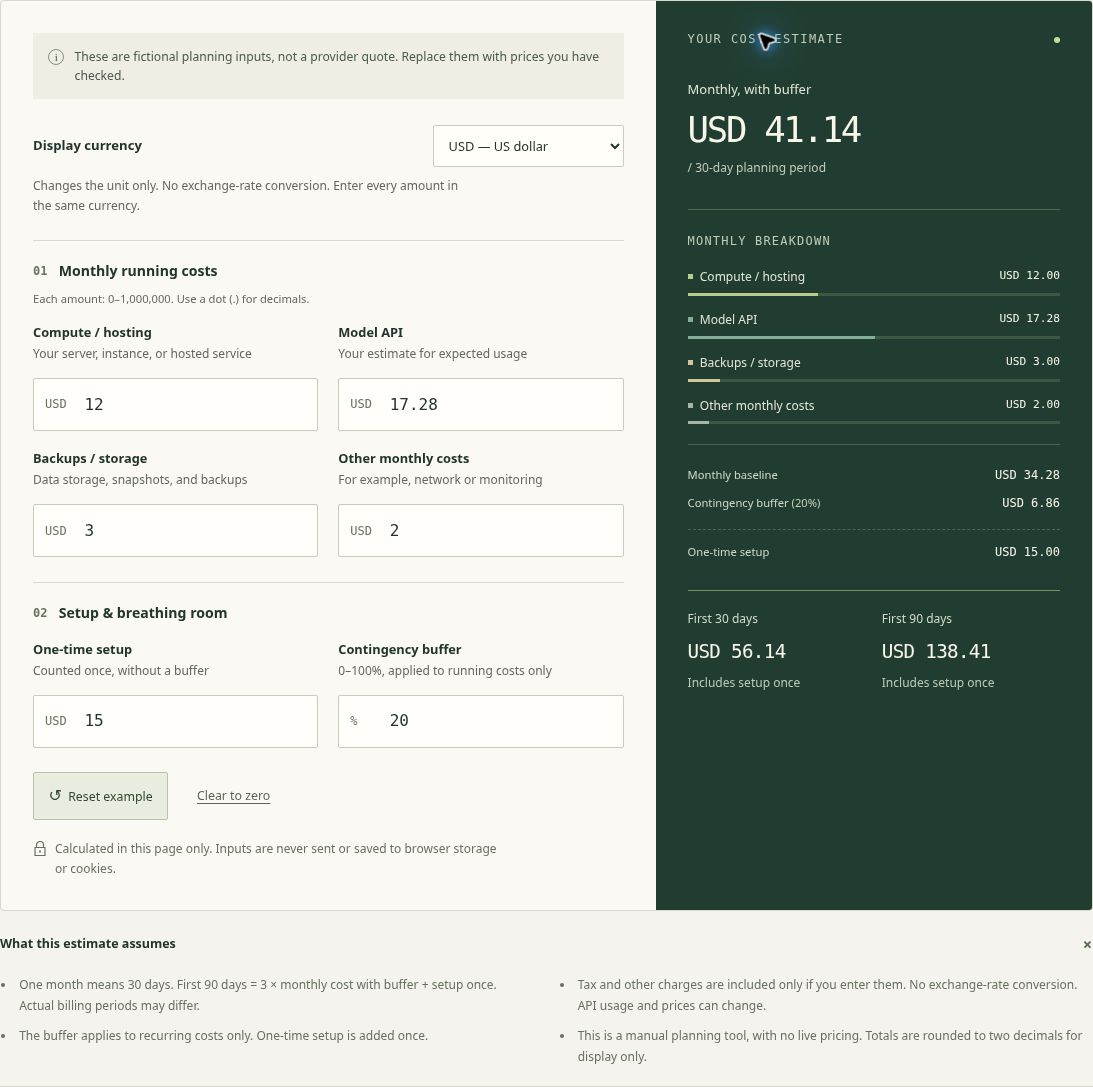
3. Enter the six calculator inputs
Open the cost calculator in a second tab and follow these steps. Leave this guide open for the expected results.
- Set Display currency to USD
- Choose Clear to zero. Every input and total should read zero
- Enter all six values in the table. Type numbers only, with a dot for decimals. Totals update as you type; there is no Calculate button
- Compare the summary with the checkpoint below
| Exact field label | Enter | What the fictional amount covers |
|---|---|---|
| Compute / hosting | 12 | Application host allowance; no local inference |
| Model API | 17.28 | The token calculation in step 2 |
| Backups / storage | 3 | Combined backup, snapshot, and storage allowance |
| Other monthly costs | 2 | Network and monitoring allowance |
| One-time setup | 15 | An assumed one-off setup expense |
| Contingency buffer | 20 | 20% reserve on recurring costs only |
All of these amounts are hypothetical, including the backup and network allowances. Taxes, currency conversion, domain renewal, extra tools, and your own time are not priced in this exercise. Add actual costs before using the result to make a purchase decision. The buffer is a planning reserve, not a provider charge or a cap.
Expected result
| Summary line | Expected USD display |
|---|---|
| Monthly baseline | 34.28 |
| Contingency buffer | 6.86 |
| Monthly, with buffer | 41.14 |
| One-time setup | 15.00 |
| First 30 days | 56.14 |
| First 90 days | 138.41 |
Check the unrounded calculation: recurring costs = 12 + 17.28 + 3 + 2 = 34.28. Buffer = 34.28 × 0.20 = 6.856. Monthly with buffer = 41.136. First 30 days = 41.136 + 15 = 56.136. First 90 days = 3 × 41.136 + 15 = 138.408.
The calculator rounds only for display. Multiplying the displayed 41.14 by three and adding 15 gives 138.42, one cent above the correct displayed 90-day estimate. Setup is added once, and the buffer is not applied to it.
4. Test a busy month and a retry incident
Keep compute = 12, storage = 3, other = 2, setup = 15, and buffer = 20. Change only Model API for each scenario:
| Scenario | Model API input | Monthly with buffer | First 30 days | First 90 days |
|---|---|---|---|---|
| Normal: 20 tasks/day | 17.28 | 41.14 | 56.14 | 138.41 |
| Busy: 40 tasks/day | 34.56 | 61.87 | 76.87 | 200.62 |
| Failure stress: 1,000 extra calls every 30 days | 25.28 | 50.74 | 65.74 | 167.21 |
All amounts are hypothetical USD. The busy case doubles calls with the same per-call assumptions. It does not establish that the same application host can handle the load; rerun the capacity check before retaining its cost allowance.
The failure case adds 1,000 × USD 0.008 = USD 8 of extra calls on top of ordinary usage and normal retries. This row intentionally repeats that incident allowance in every 30-day period. It is a stress budget, not a forecast or a claim that a limiter was tested.
If you instead want to model one incident across all 90 days, restore Model API to 17.28 and enter 23 in One-time setup: the original 15 plus the one-off 8. This uses the calculator’s one-time bucket for an exceptional cost; it does not mean the incident is a setup activity. Expected First 30 days: 64.14; First 90 days: 146.41. No buffer is applied to that one-time 8, and this simple tool places it in the first period. For an incident in a later month, use a dated cash-flow worksheet instead.
Now restore the normal six inputs. Write down your own affordable 30-day ceiling and compare all scenarios with it. If an unwanted tool loop could exceed that ceiling, changing a reserve percentage will not protect you: define maximum calls or tool steps per task, retries, output size, execution time, and concurrent jobs in the application. Specify what happens to partial work and test the limits separately before launch.
5. Check failure states and recover
These checks are safe calculator interactions. They do not affect a cloud account.
| Try this | Expected behavior | Recover |
|---|---|---|
| Delete the Compute / hosting value | Field error; totals replaced by dashes, not stale numbers | Enter 12 |
| Enter -1, USD12, 1,000, or 1e3 | Invalid input; no estimate | Use a plain non-negative decimal, such as 12 or 1000 |
| Enter buffer 101 | Error because the permitted range is 0–100% | Enter 20 |
| Switch USD to CNY | Same numeric totals, different label; no conversion | Return to USD; convert your source amounts separately if needed |
| Choose Reset example | Built-in values 12 / 20 / 3 / 0 / 0 / 15; monthly 40.25 and 90-day 120.75 | Re-enter this guide’s six values; Reset example does not restore them |
| Choose Clear to zero | All six inputs and totals become zero | Re-enter the inputs you saved |
Each money field accepts 0–1,000,000. If inputs stay disabled or a change leaves the fixed example on screen, check whether JavaScript is enabled and the page script loaded; reload once and verify that Clear to zero really changes the results. Do not treat a noninteractive fixed example as your estimate. A zero estimate means you entered no cost, not that your deployment is free.
6. Replace assumptions before purchasing
DeepInfra source note: three different cost lines
The following is official product information checked on October 24, 2026, separate from the fictional exercise above. It is not a DeepInfra deployment tutorial or an observed bill.
| Product | Billing basis | Budget treatment |
|---|---|---|
| Custom LLMs on dedicated GPUs | The public pricing page lists A100 80GB at USD 1.49 per GPU-hour, billed with minute granularity | GPU count × billable uptime × applicable rate belongs in compute; an hourly quote is not a token rate |
| Token-priced inference API | Input/output token rates depend on the model and applicable token category | Model API line; use measured or estimated billable tokens |
| Hosted Agents | Managed agent VM compute plus separately billed model inference | VM charge in compute; model calls in Model API. Do not count either twice |
The Hosted Agents introduction specifies hourly compute while an instance is active, including creation, startup and shutdown; stopped instances do not incur compute charges. Model usage is billed separately at standard token prices. The documentation directs readers to the creation dialog or instance details for current plan rates; we did not access an account or create an instance.
Effective-date boundary: the vendor notice reported to the editor gives November 9, 2026 for new dedicated-GPU rates. The public pricing page checked above does not state that date. The notice and the public price are separate evidence: the page alone does not establish an early increase for existing instances. Confirm the rate applicable to your instance and billing period. This dedicated-GPU notice does not establish a price increase for the token API or Hosted Agents.
Build your actual purchase checklist
Make one line per actual resource in your own ledger: resource and region; billing unit; quantity; current rate and source date; calculator bucket; owner; retention; removal method. Keep both the normalized 30-day operating cost and the actual cash due. An annual domain payment divided by 12 is useful for comparison, but it is not the amount charged at renewal; do not also count the same expense twice.
Verify these items against the exact product and checkout configuration:
- Compute: vCPU, RAM, disk, architecture, region, hourly/monthly treatment, and optional features. The Vultr provisioning reference lists the configuration choices; it does not certify a plan for this agent
- Backups and storage: price automatic backups and retained snapshots separately if using both. Check automatic-backup fees and snapshot billing, plus any attached storage. A recovery copy may outlive the server and keep costing money
- Network: include report downloads and transfers to external backup destinations. Vultr’s general bandwidth policy meters outbound internet transfer, not inbound transfer. Confirm the actual product’s allowance, region-specific terms, and overage rate
- Idle and exit costs: stopped Vultr instances remain billable. Destroying an instance releases its allocation and permanently deletes its data. Verify recovery first; review independent storage and snapshots separately. This exercise does not ask you to destroy anything
- Cash and people: applicable tax, invoice currency, conversion fees, promotion expiry, renewal charges, operator time, and the cost of a temporary second server for a restore drill. Treat credits as a temporary offset, not a sustainable operating price
Finish with a small decision record: chosen architecture, workload targets, unverified capacity assumptions, dated rate sources, normal/busy/failure totals, spending-alert owner, and exit plan. Alerts only notify unless a specific enforced limit says otherwise. Reconcile the first real invoice and usage report against your ledger, then replace estimates with observed cost per accepted result.