A useful restore must recover a recognizable conversation, the exact files it references, and the intended task state. It must also avoid repeating an action that already happened outside the backup. An archive checksum or a running database cannot establish all four.
This article separates three evidence levels: an executed Hermes API backup/import round-trip in an official container, an executed local SQLite snapshot-helper test, and a full CLI/task-recovery protocol that remains unexecuted. Both executed tests used synthetic fixtures, with no provider keys, model calls, real messages or production data. The application test explicitly blocked service startup; it was not a normal gateway deployment.
Actual application recovery: what passed on Railway
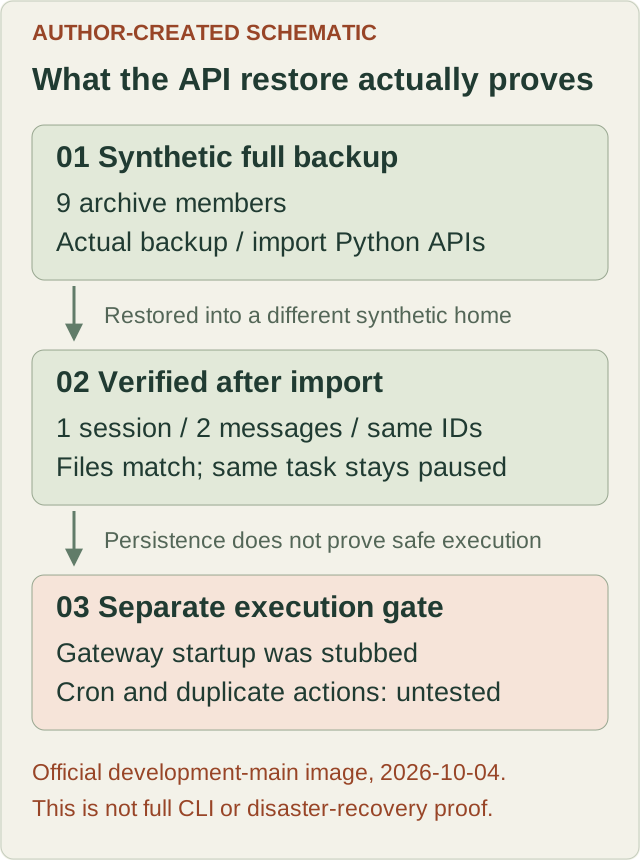
At 2026-10-04T01:58:28Z, the guarded harness ran inside the official nousresearch/hermes-agent:main image on a temporary Railway Linux VM. The container exited 0, and its result recorded passed: true. This was the development main channel, not a stable-release certification. The exact digest was:
nousresearch/hermes-agent@sha256:4ab33c59d8ae5a1660f24b3065626853d09a2b42f28e77e85de99798be08a663The image revision and nine inspected core source hashes matched 158fd638da1629c8e62caf9ade1515d162def8ab. The host was x86_64 Ubuntu 26.04.1 LTS with Docker 29.1.2; the container used Python 3.14.7 and SQLite 3.53.1. The retained application result and console record gives the exact identity, checks and limitations.
The harness called real SessionDB, cron storage, run_backup and run_import APIs. It exported and restored 9 archive members into a different synthetic home. Independent checks confirmed:
- Records: 1 session and 2 messages; both roles, contents and durable message IDs matched, and source/restored database integrity returned
ok - Files: the workspace sentinel and referenced script had identical SHA256 hashes before and after import; the backup ZIP hash was independently rechecked
- Task state: job
f306ea79f5f3retained its identity and remainedpaused,enabled: false,no_agent: true, with local delivery and no previous/next run - Isolation: container network
none, read-only root filesystem, no published ports, no real credentials or host Docker socket, all capabilities dropped and no-new-privileges enabled; the image’s normal entrypoint was bypassed
The actual application console included:
Backup complete: /lab/api-roundtrip/synthetic-full-backup.zip
Import complete: 9 files restored in 0.0s
PASS: real Hermes API round-trip; service start stubbed; no cron execution
That 0.0s is the application’s rounded report for a tiny synthetic import, not a recovery-time benchmark. The retained result records one intercepted service-start call with context import. Gateway startup was deliberately replaced with a test stub; no scheduler or task ran. A recovered paused definition proves persistence, not correct execution or prevention of duplicate actions. No model-generated response, full CLI entrypoint, dashboard, SSH tunnel, host reboot or external-action behavior was tested.
The following protocol remains a separate operator exercise. Its command blocks were not run verbatim in this API test, and its outstanding gates must not be inferred from the successful round-trip.
Earlier local snapshot-helper test
On 2026-10-04, we executed the unmodified upstream backup_sqlite.py and its upstream preflight test at commit 158fd638da1629c8e62caf9ade1515d162def8ab, with a small additional test harness. Python was 3.12.14 and SQLite was 3.53.1. This says nothing about the Python version needed to install the complete current Hermes application.
The harness invocation was python -I -S run_lab.py. It used only Python’s standard library, fresh synthetic directories and local child processes. Source Git blob identities were verified before execution. The machine-readable result record includes the pin, hashes, command arguments, exit codes and boundaries; absolute laboratory paths are normalized.
Observed results:
- A plain copy of the main database file missed a committed row still present only in its WAL. The actual upstream snapshot helper recovered that row, and SQLite integrity checking returned
ok - Creating three snapshots with retention two kept the newest two. Corrupting only the synthetic input produced exit code 1 and preserved the previous published snapshots
- A missing
state.dbreturned exit code 0 withpath: null. That is a no-op, not a usable backup - A deliberately locked source failed closed at a configured 0.2-second deadline, without a raw-copy fallback
- SIGTERM ended the helper with return code -15, preserved the prior
.bak, and published no new.bak. It did leave a.partialstaging file. Retry produced a valid snapshot but did not remove that stale staging file
These observations verify the real helper, not the Hermes session schema, full ZIP backup/import, cron scheduler, cloud storage or disaster recovery. A .partial file must not be promoted or restored just because it exists. Review abandoned staging files only after confirming no backup process owns them.
1. Choose the right recovery unit
At the checked source pin, a full archive is created with hermes backup; it is restored with hermes import, not hermes restore. A quick snapshot is a different operation. Check your installed version’s help before copying these commands.
hermes backup --help
hermes import --help
hermes cron --help
The full archive can contain configuration, credentials, sessions, state databases, profiles, scripts and ordinary files under the Hermes data root. It is not automatically encrypted. Do not upload it to a public issue or repository. External project working directories are not covered merely because their paths appear in a session. Inventory those files separately.
Quick snapshots select specific state/configuration entries; they do not replace a full archive of scripts, workspaces and skills. At this pin, cron/executions.db is selected for a quick snapshot but cron/deliveries.db is not. A quick rollback therefore cannot be treated as a complete migration of scheduled work and delivery state.
Full backup uses the default Hermes data root, including profiles; full import targets the active home/profile. Confirm both resolved paths. Do not assume a named profile automatically scopes an entire backup or that setting one environment variable prevents writes elsewhere.
2. Isolation is a hard gate, not a directory name
Stop before full import unless the recovery environment has been reviewed. Current import code can install and start a gateway after extracting files. There is no --no-start option. A different HERMES_HOME alone does not prevent this side effect.
For the later full test, require:
- A disposable environment with synthetic HOME and state only; no inherited provider tokens, messenger sessions, production mounts or SSH material
- Verified service behavior for the pinned release, so import cannot start an unreviewed gateway or scheduler; no host service-manager or Docker-socket access from the restore sandbox
- Outbound actions unavailable during import and inspection. Creating or changing those network restrictions is a separate operator-approved setup step, not a command this article silently runs
- Different, initially empty source and restore homes, plus a small evidence/effect directory outside either home
- Source and target never running schedulers at the same time; pause both before the consistency checkpoint
A harness that replaces service-start functions with test stubs may exercise import internals, but must be labeled an API test rather than full CLI/service proof. The API variant with explicit service stubs has now passed as recorded above; the unmodified full CLI/service path has not. Do not add an imaginary --no-start flag or use --force as an isolation mechanism.
3. Seed recognizable state using the actual application
The following blocks are proposed commands for an installed, pinned Hermes runtime after the isolation gate passes. They have not run here. Use that installation’s Python executable so imports refer to the real Hermes code. SOURCE_HOME, TARGET_HOME and ARCHIVE below must be absolute paths in the disposable lab; neither home may be an existing profile. Place the source outside the native ~/.hermes tree and outside any <root>/profiles/<name> layout so full backup does not silently expand to their parent root. Set HERMES_HOME="$SOURCE_HOME" before the Python fixture as well as before the cron commands. Create the new source home first; keep the destination empty.
Create a conversation with the actual SessionDB API, rather than a hand-made table that merely resembles agent state:
import os
from pathlib import Path
from hermes_state import SessionDB

home = Path(os.environ["HERMES_HOME"])
(home / "workspace").mkdir(parents=True, exist_ok=True)
(home / "workspace" / "restore-marker.txt").write_text(
    "synthetic restore marker: cobalt-harbor-57\n", encoding="utf-8"
)
with SessionDB(db_path=home / "state.db") as db:
    db.create_session("lab-session", "cli", model="synthetic",
                      cwd=str(home / "workspace"))
    db.append_message(session_id="lab-session", role="user",
                      content="Read the synthetic restore marker")
    db.append_message(session_id="lab-session", role="assistant",
                      content="Fixture response, not a model-generated result")
    rows = db.get_messages_as_conversation("lab-session")
    assert len(rows) == 2
    assert all(row["message_uid"] for row in rows)
    print(rows)
Save those actual message UIDs, roles/content, session ID, file SHA256 and database schema/integrity result before backup. These inserted messages are fixtures, not evidence of a model response. Run this once in the new source home; a second seed operation is not part of a restore test.
Create a real paused, no-model task through Hermes. Its script belongs in the active home’s scripts directory, not cron/scripts:
export HERMES_HOME="$SOURCE_HOME"
mkdir -p "$HERMES_HOME/scripts"
printf 'print("hermes-lab-sentinel")\n' > "$HERMES_HOME/scripts/sentinel.py"
hermes cron create 'every 1h' --name lab-sentinel \
  --no-agent --script sentinel.py --deliver local \
  --paused --paused-reason 'Restore rehearsal'
hermes cron list --all
sha256sum "$HERMES_HOME/workspace/restore-marker.txt" \
  "$HERMES_HOME/scripts/sentinel.py"
Record the actual returned job ID. Require the job to be paused/disabled with no next run scheduled, and save its schedule, script, no_agent and local-delivery settings. Merely supplying a script without --no-agent can still involve a model. No task runs at this stage.
4. Take an application-consistent full backup
Stop or quiesce every process writing the source state, including gateway, cron and dashboard mutation paths. A consistent SQLite snapshot is one database’s consistency boundary; it does not make jobs.json, several databases and workspace files a single transaction.
After verifying the resolved backup data root is the synthetic source:
if HERMES_HOME="$SOURCE_HOME" hermes backup --output "$ARCHIVE" --keep 0; then
  printf 'Backup exit code: 0\n'
else
  rc=$?
  printf 'Backup failed, exit code: %s\n' "$rc" >&2
  exit "$rc"
fi
sha256sum "$ARCHIVE"
python -m zipfile -t "$ARCHIVE"
python -m zipfile -l "$ARCHIVE"
--keep 0 disables archive pruning. Record the backup command’s exit code before running later commands. A retained partial archive is not success: current full backup can retain it and exit 1; lock contention can exit 2. Stop on any nonzero result. ZIP integrity checking checks the container format, not application completeness.
Check that the inventory includes the expected database, marker, script and cron job data. Full exports exclude some runtime/cache/code trees, symlinks and SQLite sidecars. Some memory providers can add _external/ members restored outside the active home under HOME. Reject unexpected external entries in this synthetic exercise; do not extract an unreviewed archive into a real user home. Record any separately backed-up workspace paths and their hashes.
5. Restore into an empty destination and verify meaningful data
Only after the service/network isolation gate and archive review:
HERMES_HOME="$TARGET_HOME" hermes import "$ARCHIVE"Do not use --force for this new-empty-target rehearsal. Capture the exit code and warnings. Import preflights selected archive members, but it is not an all-files transaction: a later failure can leave a partially restored target. Preserve the failed target for diagnosis and retry into another new empty destination, not over the only good source.
Before starting any worker, require all of these checks:
- Open the restored session through real
SessionDB; the same session ID, two message UIDs, roles and content must match the pre-backup record. Run SQLite integrity checking too; row count alone is insufficient - Recompute both file hashes and compare by relative path. The stored session working-directory path may still reference the old source; verify and deliberately remap it before any tool execution. Do not let a successful file read silently use the old source
- Run
HERMES_HOME="$TARGET_HOME" hermes cron list --all. The original job ID, pause state, schedule, script and local/no-agent options must be preserved. Do not recreate the task to make a missing restore look correct - Confirm gateway/scheduler processes have not started unexpectedly. Record what import did with runtime identity files rather than copying old PID/lock files back by hand
- In a separately approved execution phase, run the restored sentinel once and inspect its output/history:
HERMES_HOME="$TARGET_HOME" hermes cron run "$JOB_ID"
HERMES_HOME="$TARGET_HOME" hermes cron runs "$JOB_ID" --limit 20
An explicit manual cron run overrides the paused setting. Its local output should be the sentinel text, and its actual history must show the run. This would prove a recovered task can execute without a model call; it would not prove scheduled exactly-once execution. Never infer that this step is safe merely because the task was paused.
6. Test duplicate actions before re-enabling schedules
Hermes keeps job definitions, execution history and delivery state separately. Restoring an older ledger can erase evidence that a job already acted. External messages, payments and publications are not rolled back with the archive.
Use a second, deliberately harmless no-agent script whose only effect is appending its fixed synthetic operation ID to an independent local effect log outside both backed-up homes. Run the following cases only in the isolated runtime and retain actual before/after line counts:
- No run during recovery: import and inspect while jobs remain paused. The independent effect log must remain unchanged
- Old backup after a completed effect: take a backup before the harmless effect, run it once on the source, keep that source stopped, then restore the older backup. The log must still contain the already-performed effect even though restored history predates it
- Deliberate retry: manually invoke the restored harmless job. A second effect demonstrates the replay risk; do not mislabel it a scheduler bug or claim manual retries are deduplicated
- Guarded retry: repeat with an explicitly designed receiver-side operation key retained outside the backup. Verify the receiver declines the duplicate and the effect count remains unchanged. This requires the real test implementation and results; a rule written in a prompt is not a durable idempotency mechanism
- Ambiguous interruption: stop the lab job after its local effect but before completion is recorded. Reconcile the independent log before any retry. An unknown/failed attempt is not evidence that nothing happened
These cases are not executed here. Do not test them by sending real mail or making payments. Hermes’s occurrence claims and ledgers do not establish an end-to-end exactly-once guarantee across old restores or two copied homes. Keep consequential tools disabled until each post-backup effect is reconciled and exactly one intended scheduler owns the workload.
Recovery acceptance record
Record the real image/source pin, synthetic source and target identities, archive hash/inventory, backup and import exit codes, timestamps, validation outputs, preserved job ID, task history, independent effect-log counts, failure behavior and cleanup state. Measure backup age and time to verified readiness separately; do not manufacture a recovery-time target from an unrun plan.
The current result is deliberately narrower: the pinned snapshot helper and guarded application API backup/import passed; full CLI/service recovery, task execution and duplicate-action gates remain open. Cloud loss, encrypted off-host recovery, actual model work and dashboard/reboot behavior are not covered by that helper result. The private dashboard recipe has its own acceptance gates.