Execution status: UNEXECUTED. This page describes what an operator should verify on an isolated test instance. It contains no observed outputs, deployment screenshots, or claim that a particular configuration works. Record a result only after completing the corresponding check.
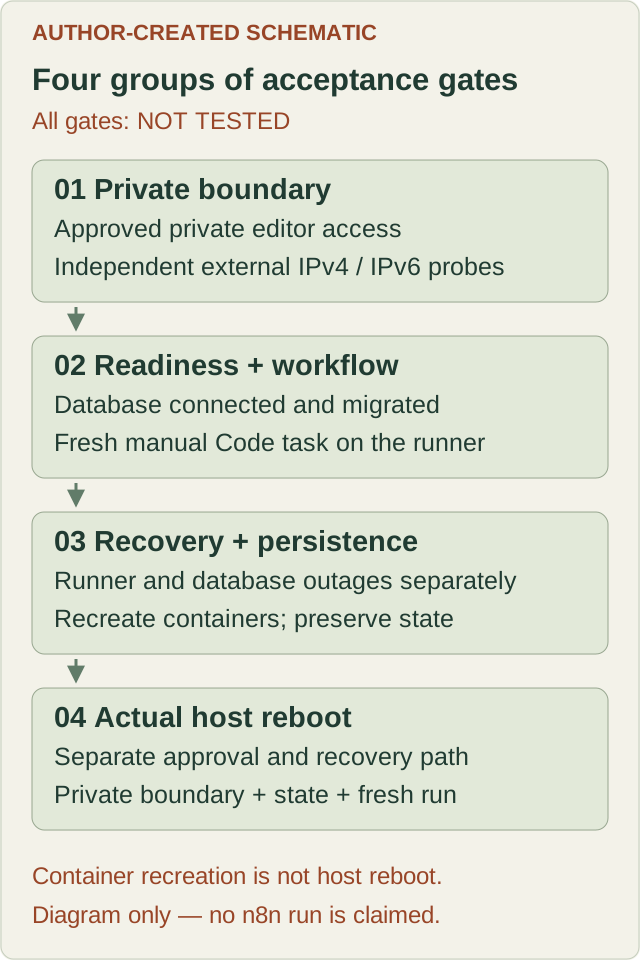
1. Define the test boundary
Use a disposable Linux host or an isolated lab on an already-authorized host. You need a maintained Docker Engine, Compose, an existing secure administration path, enough disk space, and a way to recover access if a reboot fails.
Use only synthetic workflow data. Do not connect production credentials, import real workflows, enable scheduled triggers, or send requests to outside services during this exercise.
The proposed baseline has three services: n8n, PostgreSQL, and an external task runner. PostgreSQL and the task broker remain on private container networks without host-published ports. Give the runner access only to the broker network; do not mount database storage, n8n configuration, or the Docker socket into it. Privileged containers, Docker-in-Docker, and host networking are outside this baseline.
For the editor, choose an existing approved private access method. A loopback-only host mapping with an SSH tunnel is one possible design. Record the actual access path before testing. Do not solve an access problem by publishing the editor to every host interface. The Docker/UFW explanation in the Hermes guide explains why UFW status alone cannot establish the boundary; the Hermes commands are not an n8n configuration.
2. Review the upstream example before adapting it
The official withPostgres example is a starting point for review. At the source revision checked for this page, it includes an external runner, PostgreSQL 18, persistent database and n8n volumes, and a database startup health check. It also publishes the editor as 5678:5678, which does not meet this guide’s private-access boundary. Review and deliberately replace that exposure before any startup. The example also leaves the services on a shared default network: separating database and broker networks is an additional design step, not a property of that example. See the reviewed Compose source.
Choose a maintained n8n release and matching runner release, then record both image digests. Use external mode and a privately supplied shared authentication token. The runner must reach the broker through its container-network address; localhost in the runner refers to the runner itself. Check the selected release’s configuration documentation instead of carrying forward old flags. See task-runner configuration.
Supply database passwords, the runner token, and the encryption key through an approved private configuration method. Keep them out of shell command arguments, Git, screenshots, and exported evidence. Do not publish a resolved Compose configuration containing secrets.
Record the chosen PostgreSQL image, data directory, volume identity, and application database role. A major-version database upgrade requires its own migration plan. Do not attach an existing production data directory to a different PostgreSQL major version as a test. The upstream README documents its storage assumptions.
3. Establish the baseline
Before starting, record:
- Date, host operating system, Docker and Compose versions
- Exact n8n, runner, and PostgreSQL image identities
- Non-secret configuration revision and intended network boundaries
- Database and n8n volume identities, plus the encryption-key storage method
- A startup deadline and a recovery deadline appropriate to this lab
- Which checks require separate approval, especially service interruption and host reboot
After startup, inspect service state, restart counts, relevant logs, port bindings, and networks. Capture only redacted evidence. A running container alone does not establish acceptance.
From a separate authorized machine, test that the editor, database, and broker cannot be reached through unintended host interfaces. Include public IPv4 and IPv6 where assigned. Record the source of the test. A probe from inside the host does not establish external isolation. A timeout alone is inconclusive if the host’s availability and intended private access have not also been checked.
4. Check reachability and database readiness separately
n8n documents two distinct checks:
/healthzreturning HTTP 200 indicates that the instance is reachable; it does not establish database health./healthz/readinessreturning HTTP 200 indicates that the database is connected and migrated.
Use the configured endpoint paths if they differ from the defaults. See n8n monitoring.
Probe through the approved private path with finite connection and overall timeouts. Record timestamps, HTTP status or transport failure, and elapsed time. Wait only until the recorded startup deadline.
Acceptance requires readiness plus the workflow test below. Neither endpoint proves that a Code node can obtain an external runner.
5. Run a synthetic manual workflow
Create a new workflow named DeployManual n8n acceptance. Use a Manual Trigger connected to a JavaScript Code node in Run Once for All Items mode. Have the Code node return one item containing the marker deploymanual-n8n-lab and a numeric total calculated as 2 + 3. No credentials, imports, file operations, network requests, or additional nodes are needed. See the Manual Trigger and Code node references.
Save the workflow, remove any pinned test data, and execute it manually.
Expected acceptance criteria, not observed output:
- The whole workflow completes successfully
- The output contains the intended marker and numeric total
5 - Redacted runtime evidence supports that the configured external runner handled the Code task
- Reloading the editor retrieves the saved workflow from the intended database
Record the workflow identifier, execution identifier when available, timestamp, and observed result. A screenshot of the editor or a previously saved output is insufficient.
This tests one small JavaScript path. Python, webhooks, scheduled execution, queue workers, third-party integrations, and load behavior remain untested.
6. Test runner and database interruption deliberately
Only perform these checks on the isolated lab with approval to interrupt its services. Record the stop and recovery times. Do not delete storage.
Runner interruption
Stop only the runner service and execute the synthetic workflow. Observe whether the Code step waits or fails during the configured task deadline; it must not report a successful Code result without a runner. Record the actual outcome, and treat unresolved waiting beyond the observation deadline as incomplete acceptance. The editor and database readiness may remain available. Restore the runner, allow it to reconnect, and start a fresh manual execution. Require a successful result before proceeding.
Database interruption
With no important execution in flight, stop only PostgreSQL. Probe both health endpoints throughout the outage. Readiness must stop reporting the instance as ready within the agreed observation window. Depending on process behavior, this may appear as a non-200 response or an unavailable connection. Do not prescribe an exact error code or require /healthz to remain available.
Restore the same database service with the same volume. Require readiness to recover, the saved workflow to remain present, and a new synthetic execution to succeed. Check for unexplained restart loops or migration failures.
If manual intervention is needed, record it. Do not describe the result as automatic recovery. A successful new execution also does not prove that an interrupted execution resumed safely.
7. Verify persistence and host reboot as separate gates
First, recreate the application containers through the reviewed Compose configuration while preserving all volumes and the encryption key. Verify the same workflow is still present and runs successfully. Check storage attachment identities if the instance appears empty.
PostgreSQL does not remove the need to preserve n8n’s own state directory and encryption key. See n8n’s persistence guidance. Never use a volume-removal operation as a restart shortcut.
Then, if separately approved, reboot the actual host. Have an out-of-band recovery path ready. Verify Docker startup, service recovery without an interactive terminal, private network boundaries, database readiness, retained workflow state, and a fresh synthetic run.
Container restart and container recreation do not prove host-reboot recovery. If the environment cannot be rebooted, mark that gate not tested.
8. Troubleshooting and completion
- Reachable but not ready: inspect database connectivity, role permissions, migration logs, disk capacity, and volume attachment.
- Ready but Code execution fails: inspect runner connectivity, version alignment, token configuration, and task timeout. Do not expose the broker publicly.
- State appears missing: stop writes and check the Compose project identity, database target, data directory, and attached volumes. Do not initialize or delete storage to hide the problem.
- Works only after a manual restart: capture the dependency sequence and intervention; recovery acceptance remains incomplete.
- Unexpected external reachability: stop the lab service and correct the boundary before continuing.
For every gate, retain one status: not tested, passed, failed, or blocked. Add the date, environment, evidence reference, and any intervention. All gates in this published reference currently remain not tested:
| Acceptance gate | Published status |
|---|---|
| Private access and external IPv4/IPv6 boundary | Not tested |
| Reachability and database readiness | Not tested |
| Fresh synthetic workflow on the external runner | Not tested |
| Runner interruption and recovery | Not tested |
| Database interruption and recovery | Not tested |
| Persistence after container recreation | Not tested |
| Actual host reboot and fresh execution | Not tested |
Passing this lab supports only the recorded configuration and checks. Backup restoration, credential decryption after restore, production ingress, upgrades, capacity, and disaster recovery each need their own evidence before production use.